TV Normalizer
Even volume for everything your Mac plays. Quiet dialogue comes up, loud ads stop blasting, and it costs nothing.
What it does
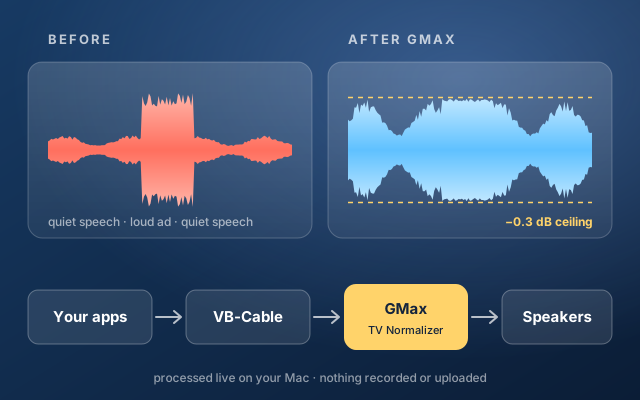
TV Normalizer is a small menu bar app. It sends everything your Mac plays through GMax, a free limiter made by GVST. GMax raises the sound by an amount you choose, +12 dB to start, and stops anything from going above a fixed ceiling. Quiet speech gets louder; a sudden loud ad gets held at the ceiling instead of jumping out at you.
It works for every app at once: browsers, streaming apps, video calls, games. The sound is processed live on your Mac and is never recorded or uploaded.
What you need
- A Mac. It was built and tested on an Apple Silicon Mac with macOS 26. Intel Macs should work, because GMax is made for both.
- VB-Cable, a free virtual audio device from VB-Audio. It carries your Mac's sound to TV Normalizer.
- GMax, the free limiter from GVST that does the actual work.
- Apple's free Command Line Tools, to build the app from its source.
VB-Cable and GMax aren't included here, because their licenses only let their makers hand them out. You download them from VB-Audio and GVST in the steps below.
Install it
-
Install VB-Cable
Go to vb-audio.com/Cable and download the macOS driver pack. Get the standard VB-CABLE, not the A+B or C+D packs. Open the download, run the installer, and restart your Mac if it asks.
To check it: open System Settings → Sound. VB-Cable should be in the list of outputs.
-
Install GMax
Go to gvst.uk/Downloads/GMax and download the Mac version. Open the download so you have
GMax.vst.In Finder, choose Go → Go to Folder…, type
~/Library/Audio/Plug-Insand press Return. If there's no folder namedVSTinside, make one. DragGMax.vstintoVST. It must end up at:~/Library/Audio/Plug-Ins/VST/GMax.vst -
Install the Command Line Tools
Open Terminal, from Applications → Utilities, and run:
xcode-select --installClick Install in the window that appears. If Terminal says they're already installed, go on to the next step.
-
Build TV Normalizer
Paste these three lines into Terminal and press Return. They download the source into a folder called
TV-Normalizerin your home folder and build the app:mkdir -p ~/TV-Normalizer && cd ~/TV-Normalizer curl -fsSLO "https://paymenottowork.com/done/tv-normalizer/source/{build.sh,main.mm,AudioEngine.hpp,VSTHost.hpp}" zsh build.shWhen it finishes, it prints
Builtand the app's location:TV Normalizer.appin the Applications folder inside your home folder. Building it yourself means macOS trusts it without any security warnings. -
Test it
This checks that GMax loads and limits correctly. It works on test tones in memory and plays nothing:
"$HOME/Applications/TV Normalizer.app/Contents/MacOS/TVNormalizer" --self-testYou should see a line starting with
PASS, with a gain of about 12 dB and a peak of 0.966051, which is the −0.3 dB ceiling. -
Turn it on
open "$HOME/Applications/TV Normalizer.app"The first time, macOS asks to let TV Normalizer use the microphone. Click Allow. VB-Cable counts as an audio input, and that's how the app receives your Mac's sound. It never uses your actual microphone.
GMax ON appears in the menu bar. Play something and you'll hear the difference.
Everyday use
Click GMax ON or GMax OFF in the menu bar:
Changing speakers or headphones: click Disable normalization, choose the new output in System Settings → Sound, then click Enable normalization. If you switch outputs while it's on, TV Normalizer turns itself off rather than fight your choice.
It also turns off when your Mac sleeps, and comes back on when it wakes if it was on before.
How it works
When you enable it, TV Normalizer remembers your current output and makes VB-Cable the Mac's default output, so every app plays into VB-Cable. The app reads VB-Cable, runs the sound through GMax, and plays the result on the output it remembered.
Two Core Audio units handle capture and playback, joined by a 32 ms buffer with slow resampling that keeps the two devices' clocks in step without clicks. GMax adds 1 ms of lookahead, so the delay is barely more than your speakers' own. GMax runs with a −0.3 dB ceiling and a half-second release, and a last check after it catches any invalid samples.
Your speakers are always put back. Disabling or quitting restores them, and a separate watchdog process restores them if the app ever crashes. A changed sample rate or stalled audio also switches you back to direct output.
If something goes wrong
Remove it
Click Quit and restore audio, turn off Launch at login first if you turned it on, then delete these:
rm -rf "$HOME/Applications/TV Normalizer.app" "$HOME/Library/Application Support/TV Normalizer" ~/TV-NormalizerGMax is the single GMax.vst folder you copied in. VB-Cable comes with its own uninstaller.
Source code
TV Normalizer is about 360 lines of Objective-C++ that use only Apple's own frameworks. It's free under the MIT license: use it, change it, share it.
main.mmthe menu bar app, the watchdog and the self-testAudioEngine.hppcapture, buffering, drift correction and playbackVSTHost.hppa minimal host that loads GMaxbuild.shthe build scriptREADME.mdandLICENSE
GMax is freeware © Graham Yeadon, GVST. VB-Cable is donationware © VB-Audio Software; if you use it, consider supporting them. Neither is affiliated with this page.